My progress
The My Progress page (top of the navbar once logged in) is your personal report: what training is coming up for you, how you're tracking against every SMP that applies to you, and every session you've attended this period.
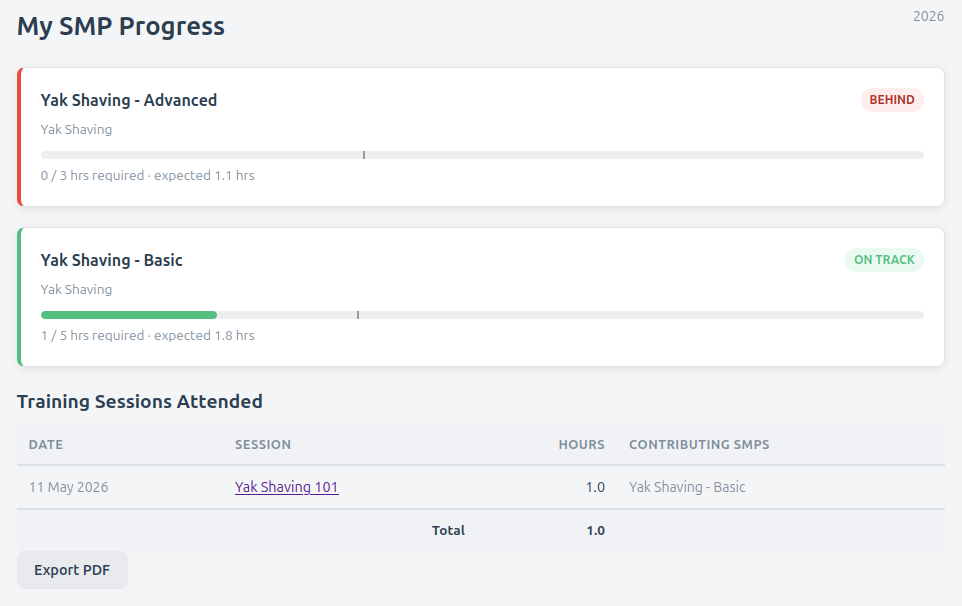
The page is split into tabs: What's Next?, SMP Progress, and Session Attendance. It opens on SMP Progress.
What's Next?
Upcoming training sessions that match your qualifications, shown as tappable tiles. Each tile shows the date and time, how many hours it's worth, how soon it is (e.g. in 3 days), the location if set, and which of your qualifications makes you eligible. Tap a tile to open the session.
If nothing is listed, there are no upcoming sessions matching your qualifications — if you think there should be, let your officer know.
SMP Progress
For each Skills Maintenance Program (SMP) you have — based on the qualifications you hold — Firecrest shows:
- The SMP name and the qualification it's linked to
- A progress bar with two markers:
- The filled bar is your logged hours so far
- A vertical line marks the pro-rated expected target for "now" in the period. The line disappears once you've reached the full minimum — no point nagging you about a target you've already cleared.
- A status badge — see below
- A summary line:
X / Y hrs required(orX / Y sessionsfor session-counted SMPs) - A warning if the underlying qualification is expired or expiring soon
Status badges
| Badge | Meaning |
|---|---|
| Met | You've reached or exceeded the full annual minimum. Job done for the period. |
| Ahead | You're more than 1 hour above the target for this point in the year. |
| On Track | Within 1 hour of the pro-rated target. You're tracking right where you should be. |
| Behind | More than 1 hour below the target. Time to plan a few more sessions. |
The pro-rated target moves linearly through the period — so a 12-hour SMP shows a target of 6 hours halfway through. Don't be alarmed if you start the year showing Behind: just attend a session or two and you'll catch up.
Session Attendance
Every session you attended this period, with the date, name, hours, and which SMPs each one contributed to. This tab has its own sub-tabs:
- Training — training sessions only
- Incidents — incidents only
- Combined — both together
Each table shows a running total of hours at the bottom, and pages if you've attended a lot.
Exporting a PDF
Click Export PDF on the Session Attendance tab to download a single-page printable summary of your SMP progress for the period. It includes department name, your details, the SMP table, and a generated-at timestamp.
This is handy for:
- Personal records
- Showing your boss what you've been doing in your volunteer time
- Audit / acquittal paperwork at year end
Period navigation
Previous/next year buttons at the top of the page let you look at past periods — useful for end-of-year records or seeing what you did last year.
When your report seems empty
If the SMP Progress tab says "No Skills Maintenance Programs linked to this member's qualifications", it means you don't currently hold any qualifications that an SMP applies to. Two possible causes:
- An officer hasn't assigned your qualifications yet — ask them to add them from your member page.
- Your department hasn't yet defined SMPs for the qualifications you hold — talk to an officer about which ones should exist.
If the SMP cards show but the Session Attendance tables are empty, you just haven't attended any sessions in this period yet. Get out there.