Kiosk wall display
The Kiosk is a full-screen dashboard built for a TV or monitor mounted at your station. Leave it running and it shows the crew what's on without anyone logging in.
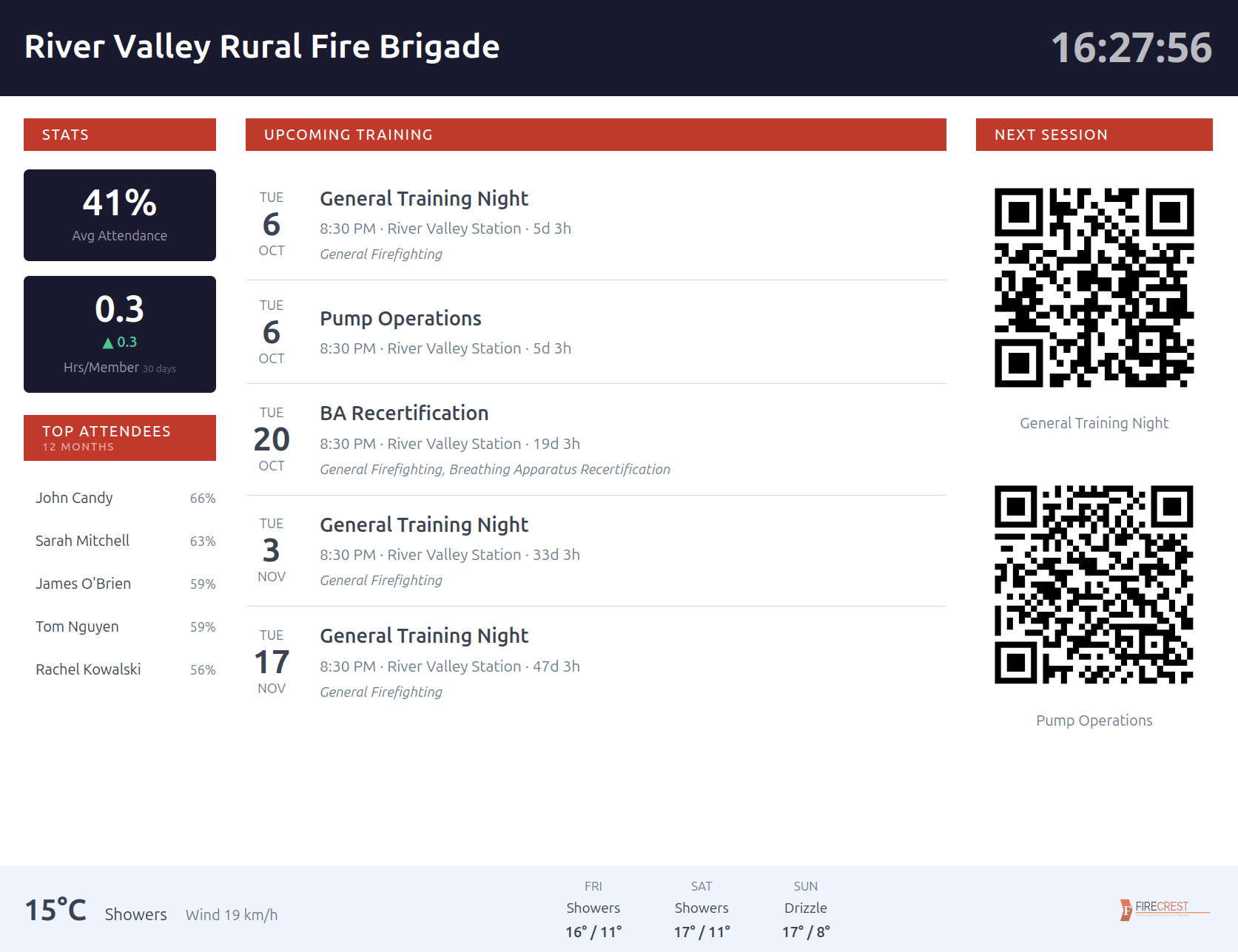
It displays:
- A large clock.
- Upcoming Training - the next scheduled sessions.
- The Next Session with its QR code, so crew can scan straight from the wall to record attendance.
- Stats - average attendance and recent hours per member.
- A Top Attendees leaderboard over the last 12 months, shown as a percentage.
- Weather - current conditions and a 3-day forecast for your station's town.
The kiosk is designed for a wide screen. On a narrow phone screen it shows a notice instead.
Turning it on
The kiosk runs at its own web address that does not require a login, so the screen can stay up permanently.
- Open Admin -> Department Settings and pick the Kiosk tab.
- Copy the Kiosk URL (or click the open button to launch it in a new tab).
- Open that URL on the station display and leave it full-screen.
Treat the Kiosk URL as semi-private
Anyone with the link can view the kiosk - it needs no password. Share it only for your station screen, not publicly.
Weather
On the Kiosk tab, set Weather Location to the town or suburb nearest your station. The kiosk then shows current conditions and a 3-day forecast. Leave it blank to hide the weather panel.